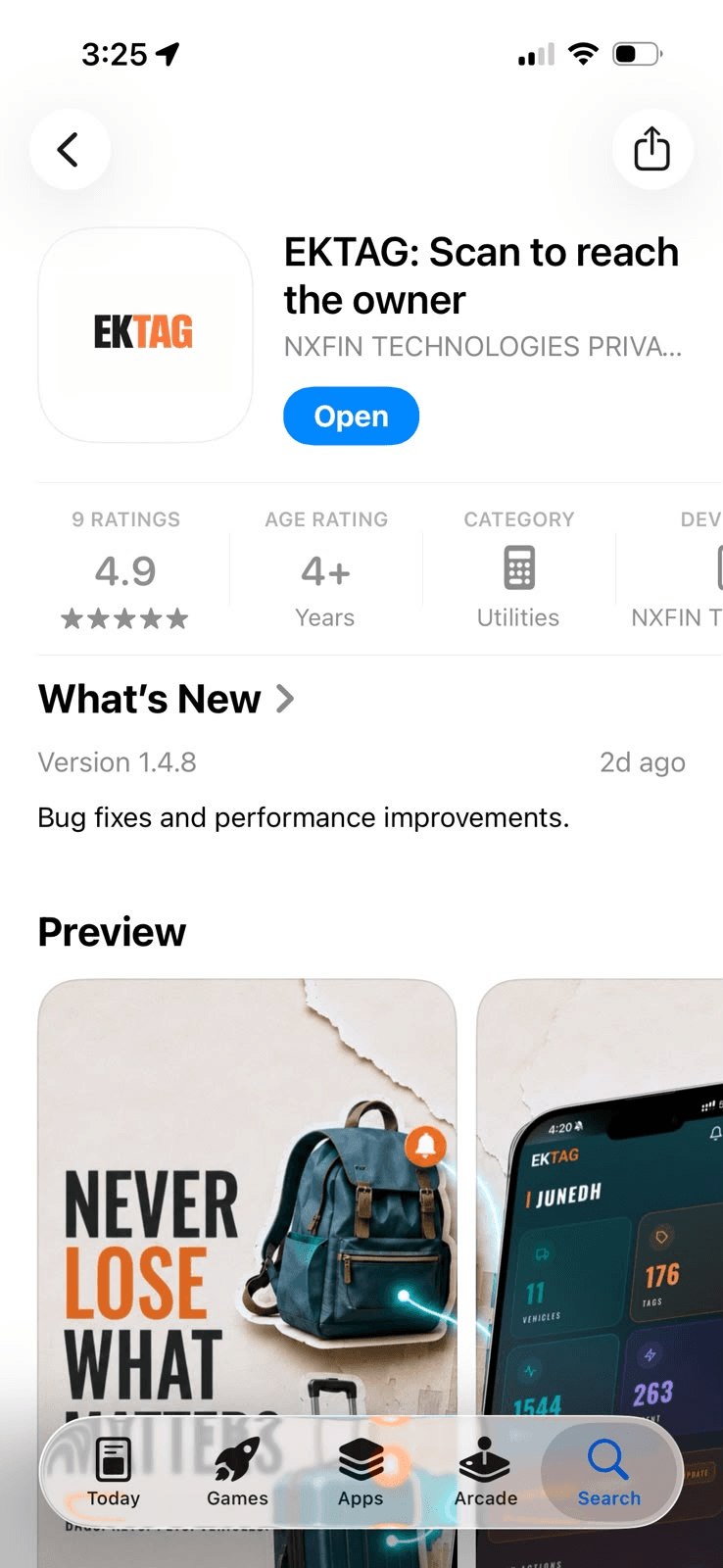
Activate Your EkTag
Open the Tags section and tap Activate Tag. Scan the QR code on your EkTag.
- Don't want to scan? Enter the tag code printed below the QR code.
- Tap Activate to continue.
Add Your Details
Enter the details you would like a finder to use to contact you, then tap Activate. (Note: the finder won't be able to see your contact details)
That's it. Your EkTag is now active. Your tag is now linked to your account and ready to use.
Put It on Your Item
That's it. Your EkTag is active and linked to your account. Attach it to your vehicle, bag, luggage, keys, pet, or any other item you want to protect.
- You can assign your tag now or do it later from the Tags section.
Want to make sure your EkTag works?
Ask a friend or family member to scan the QR code on your EkTag using their phone camera. You'll see exactly what a finder experiences, and you'll receive an instant scan alert on your own device.
What happens when someone scans your tag?
Finder scans the tag
They use any smartphone camera. No EkTag app is needed.
Instant alert sent
You are immediately notified on your phone and email.
Private contact page
The finder sees your custom instructions while your contact details stay hidden.
Anonymous connection
The finder can call or message you securely through the browser.
Your EkTag can say more than “Call me”
Update your finder message in real time from your app dashboard.
Lost your bag?
"Hi! I left my bag somewhere around Terminal 3. Please contact me or hand over to ground staff."
Pet missing?
"My pet is lost. Please keep them safe and contact me."
Missing keys or everyday essentials?
"If found near the bus interchange or gym, please call anonymously by clicking on the call button."
Need help?
Still need help?
We're here to help you get your EkTag working.
Contact EkTag SupportWe'll get back to you within 24 hours.
Secure. Smart. Simple.
Ready to protect your belongings?
Activate your EkTag and make it easier for a finder to reach you.
Need help? Visit our contact page and we'll get back to you within 24 hours.