How to Protect Your Items From Getting Lost: 9 Smart Tips
Table of Contents(16 sections)⌄
1Best Lost & Found Apps and Tags in India
Losing your keys at a café, leaving a bag in an auto, picking up the wrong suitcase at an airport, or finding out your child left their school bag on the bus can turn a normal day into a stressful search.
The problem is simple: once something is lost, you need a way to either find it yourself or give the person who finds it an easy way to contact you.
In 2026, there are several options available in India — from lost and found apps and Bluetooth trackers to QR tags for lost items.
But these solutions work differently. Some help you locate an item. Others help a stranger contact you after finding it.
The best lost-and-found solution depends on whether you want to locate your item, let a finder contact you, or do both.
2Best Lost & Found Apps and Tags in India
Instead of relying on one solution for everything, it helps to understand what each option is actually designed to do.
EkTag QR Tag
- Best for: Lost-and-found contact
- Location tracking: ❌
- Finder can contact you: ✅
- Battery required: ❌
Apple AirTag + Find My
- Best for: Apple users
- Location tracking: ✅
- Finder can contact you: ✅
- Battery required: ✅
Samsung SmartTag2 + Samsung Find
- Best for: Samsung Galaxy users
- Location tracking: ✅
- Finder can contact you: ✅
- Battery required: ✅
Google Find Hub + Compatible Tracker
- Best for: Android users
- Location tracking: ✅
- Finder can contact you: ✅
- Battery required: ✅
Community Lost & Found Apps
- Best for: Public lost-item reports
- Location tracking: Depends on the app
- Finder can contact you: ✅
- Battery required: ❌
Traditional Name Tag
- Best for: Basic identification
- Location tracking: ❌
- Finder can contact you: Limited
- Battery required: ❌
QR tags and Bluetooth trackers solve different problems. A tracker helps you locate an item, while a QR tag helps a finder contact you.
3What Is a Lost & Found App?
A lost and found app is a digital platform where people can report missing belongings, report items they have found, search listings, and sometimes communicate with other users.
Depending on the platform, you may be able to:
- Report a lost item with photos
- Add where the item went missing
- Search for found belongings
- Receive matching notifications
- Contact someone who found your item
The limitation is that the finder usually needs to know about the app and use it.
A physical tag attached directly to your belongings solves a different problem: it gives the finder a way to reach you immediately.
4What Is a Lost & Found Tag?
A lost and found tag is a physical identifier attached to an item you want to protect.
It can use:
- A name or phone number
- NFC
- Bluetooth
- GPS
- A QR code
Each technology works differently.
A traditional name tag identifies the owner. A Bluetooth tracker can help locate an item. A QR tag for lost items gives the finder a direct way to contact the owner.
🔒 If privacy matters to you, avoid printing your home address or personal phone number directly on your belongings.
5EkTag QR Tag — Best for Finder-to-Owner Contact
If your main concern is "What happens if someone finds my lost item?", a QR tag provides a simple answer.
EkTag uses physical QR stickers and tags that can be attached to keys, luggage, bags, vehicles, pets, school items, and more.
When someone finds your item, they can scan the QR code using their smartphone camera and contact you through EkTag.
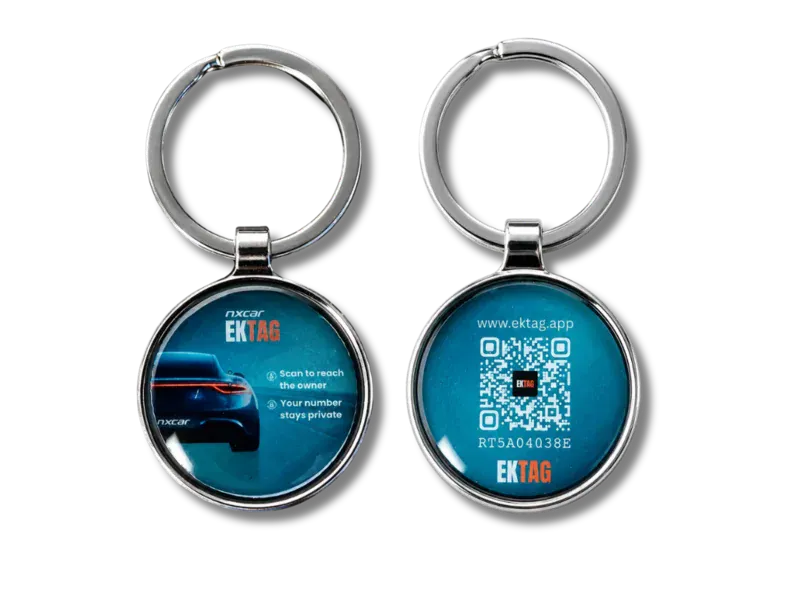
Private contact
Your personal phone number stays hidden
Easy scanning
No app required for the finder
No battery
Nothing to charge
Multiple uses
Keys, bags, luggage, pets, cars, bikes and more
A QR tag is especially useful when the person who finds your item is a stranger who simply needs a way to reach you.
Why Choose EkTag?
- Private communication
- No battery or charging
- Simple QR scanning
- No app required for the finder
- Multiple tag formats
- Suitable for everyday belongings
Best for:
People who want a simple QR lost and found tag in India rather than a battery-powered location tracker.
6Apple AirTag + Find My
Apple AirTag is designed to help iPhone users locate belongings through Apple's Find My network.
It can be useful for:
- House keys
- Car keys
- Backpacks
- Luggage
- Bikes
AirTag also supports Lost Mode, which can help a finder access contact information through NFC when configured by the owner.
Best for:
iPhone users who primarily want location tracking within Apple's ecosystem.
AirTag and a QR tag are not the same thing. AirTag focuses on helping you locate an item, while a QR tag focuses on helping a finder contact you.
7Samsung SmartTag2 + Samsung Find
Samsung SmartTag2 is designed for Galaxy users who want to locate compatible belongings through Samsung's finding ecosystem.
It can be attached to:
- Keys
- Bags
- Wallets
- Luggage
- Pet collars
Best for:
Samsung Galaxy users who want Bluetooth-based item tracking.
8Google Find Hub + Compatible Tracker Tags
Google Find Hub provides Android users with a way to locate compatible devices and tracker tags.
It is useful for people who want their tracking solution integrated into Google's Android ecosystem.
Best for:
Android users looking for a compatible location-tracking solution.
9Community Lost & Found Apps
Community-based lost and found apps work differently from physical tags and trackers.
Instead of attaching something to your belongings, you report an item as lost and search for reports of items that other people have found.
They can be useful when:
- Your item is already missing
- You want to report it publicly
- You want to search found-item listings
- You want to reach a wider community
Community apps are useful after an item goes missing, while a physical QR tag can help a finder contact you directly when they find the item.
10QR Tag vs Bluetooth Tracker vs Lost & Found App
QR Tag
- Helps you locate the item: ❌
- Helps a finder contact you: ✅
- Attached directly to item: ✅
- Battery required: ❌
- Finder needs an app: ❌
- Privacy-first contact: ✅
Bluetooth Tracker
- Helps you locate the item: ✅
- Helps a finder contact you: Sometimes
- Attached directly to item: ✅
- Battery required: ✅
- Finder needs an app: Usually no
- Privacy-first contact: Depends on setup
Lost & Found App
- Helps you locate the item: Usually ❌
- Helps a finder contact you: ✅
- Attached directly to item: ❌
- Battery required: ❌
- Finder needs an app: Usually yes
- Privacy-first contact: Depends on the platform
A tracker and a QR tag can complement each other. One helps locate an item, while the other helps create direct finder-to-owner contact.
11Which Lost & Found Solution Should You Choose?
Choose a QR Tag If
- You want a finder to contact you
- You don't want your phone number printed publicly
- You don't want something that needs charging
- You want to tag keys, bags, luggage, pets, or vehicles
Choose a Bluetooth Tracker If
- You want to locate your item yourself
- You frequently misplace things nearby
- You want proximity finding
- You already use Apple, Samsung, or another compatible ecosystem
Choose a Lost & Found App If
- Your item is already missing
- You want to report it publicly
- You want to search existing found-item listings
For important belongings, combining a tracker with a QR tag can provide both location tracking and finder-to-owner communication.
12Best Lost & Found Tags by Item
House and Car Keys
- Recommended: EkTag QR Keyring
- Why: Compact and designed for direct finder contact
Luggage and Suitcases
- Recommended: EkTag Luggage QR Tag
- Why: Easy to attach to luggage and useful when travelling
School Bags
- Recommended: EkTag QR Tag
- Why: Gives someone who finds a child's bag a simple way to contact the parent
Laptop Bags and Gadgets
- Recommended: EkTag Multi-Purpose QR Sticker
- Why: Compact and suitable for smaller surfaces
Cars and Bikes
- Recommended: EkTag Vehicle QR Sticker
- Why: Designed for vehicle-related contact situations
Pets
- Recommended: EkTag QR Pet Tag
- Why: Helps a finder contact the owner if a pet is found
Everyday Items
- Recommended: EkTag Daily Gadget Pack
- Why: Useful for protecting multiple frequently carried belongings
Avoid putting your home address or personal phone number directly on your belongings.
13What Should You Look for in a Lost Item Tag?
Before choosing a lost item tag, consider:
- Privacy — Does it expose your phone number?
- Finder experience — Can someone understand how to contact you immediately?
- Compatibility — Does it work with any smartphone?
- Battery — Does it need charging?
- Durability — Can it handle everyday use?
- Use case — Is it suitable for your keys, bag, luggage, pet, or vehicle?
- Recovery method — Does it locate the item, help the finder contact you, or both?
14Why Choose EkTag?
EkTag focuses on the moment when someone finds your lost item and needs a way to reach you.
Instead of relying on the finder to search for a lost-and-found app or know your phone number, they can simply scan the QR code attached to your belongings.
EkTag tags can be used for:
- House keys
- Car keys
- Luggage
- School bags
- Pets
- Cars
- Bikes
- Gadgets
- Everyday belongings
One small QR tag can make it much easier for a stranger to return something you've lost.
15Frequently Asked Questions
What is the best lost and found app in India?⌄
A QR tag solves a different problem: helping a finder contact the owner.
What is the best tag for lost items?⌄
Is AirTag available in India?⌄
Is AirTag better than a QR tag?⌄
Can a QR tag track my lost item?⌄
Can someone contact me without seeing my phone number?⌄
Does a QR tag need a battery?⌄
Does the finder need an app?⌄
Can I use a QR tag and Bluetooth tracker together?⌄
What items can I protect with a QR tag?⌄
16Final Thoughts
The best lost-and-found solution in India depends on what you want to happen when something goes missing.
Want to locate your belongings? A Bluetooth tracker may be the better choice.
Want to report and search for missing items? A lost-and-found app can help.
Want a stranger who finds your item to contact you directly? A QR tag provides a simple solution.
For important belongings such as keys, luggage, school bags, pets, and vehicles, using the right combination of solutions can give you better protection.
Don't wait until something goes missing. Add a simple identification and contact method before you need it.
About the Author
Product Manager – Nxcar
Prakhar is a product thinker passionate about solving real-world problems through technology. With a deep interest in how digital platforms can simplify complex transactions, he is particularly fascinated by the intersection of user experience and the rapidly evolving automotive ecosystem.